
Screenshots
App details
- Updated
- Mar 1, 2024
- Language
- English
- Developer
- Lunetek Software
- Category
- Mobile
SoftPas in:
This product is also available in the following languages:
About Stockalyze
Download Stockalyze – Technical Charting, Portfolio Management, Trading Systems, Stock Scanning
Overview
Stockalyze is a mobile application tailored for both novice and experienced traders seeking advanced tools for stock market analysis and portfolio tracking. Designed with a focus on technical charting, the app enables users to visualize market trends through detailed, customizable charts equipped with over 50 technical indicators. These include widely used tools such as Moving Averages, MACD, and Bollinger Bands, which help users identify potential entry and exit points in the market. The app also supports point and figure charting and Fibonacci retracement analysis, offering versatile methods for interpreting price behavior across different timeframes.
For investors managing multiple assets, Stockalyze provides portfolio management features that allow real-time tracking of investments through customizable watchlists. This functionality is particularly useful for traders who monitor several stocks simultaneously, ensuring they stay informed about performance shifts. Built-in trading systems and pattern detection tools further enhance decision-making by automating complex analytical processes. The app’s ability to generate alerts based on price movements or system triggers ensures users remain responsive to dynamic market conditions.
Stockalyze is positioned as a comprehensive utility within the financial technology ecosystem, serving individuals who rely on data-driven strategies. Its integration of charting, scanning, and alert systems makes it a valuable tool for active traders and serious investors. The developer did not provide additional technical details about the app’s origin or company background. However, its release date of March 1, 2024, indicates it is a recent entrant in the mobile trading space, likely built to meet growing demand for accessible, high-functionality financial tools on smartphones.
Key Features & Functionality
- Comprehensive Technical Analysis: Access to over 50 technical indicators including Moving Averages, MACD, and Bollinger Bands enables in-depth market evaluation. Users can combine these tools on single charts to validate signals and reduce false positives.
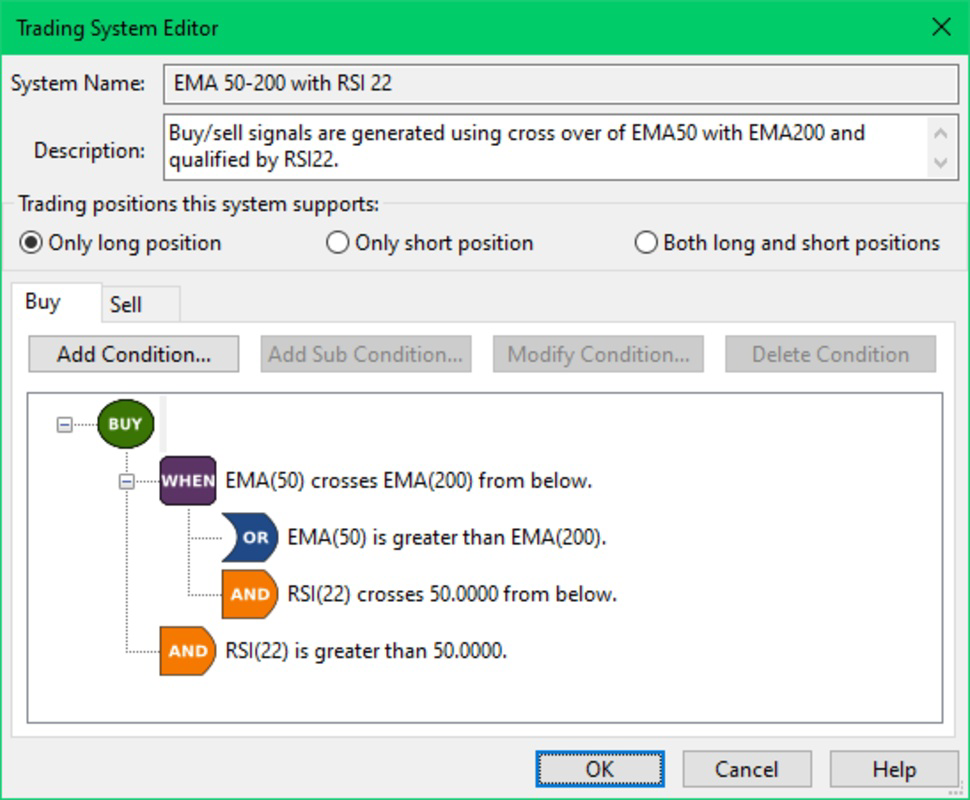
- Custom Trading Systems: The app supports both pre-built and user-created trading systems. Traders can design custom strategies using a graphical interface, allowing for personalization without requiring coding expertise.
- Stock Scanning Capabilities: A powerful scanner allows filtering of stocks based on predefined trading systems, helping users identify potential opportunities quickly and efficiently.
- Alerts and Notifications: Real-time alerts can be set for specific price levels or trading system triggers, ensuring users are notified of significant market events even when not actively monitoring the app.
- Versatile Annotation Tools: Users can draw trend lines, add Fibonacci retracements, and insert shapes to highlight key support/resistance levels, improving clarity in chart analysis and strategy sharing.
For example, a day trader might use the MACD indicator with a custom alert to receive a notification when a bullish crossover occurs on a high-volume stock. Similarly, an investor tracking a diversified portfolio could use watchlists to monitor performance across sectors, adjusting positions based on real-time data. The combination of charting precision, automation, and alerting makes Stockalyze a practical tool for both short-term and long-term trading approaches.
Interface, UX & Performance
The user interface of Stockalyze is designed with functionality and usability in mind, featuring a clean layout that prioritizes chart visibility while maintaining access to essential tools. Navigation is structured around core modules—charts, watchlists, portfolio, and settings—ensuring a logical workflow for users of varying experience levels. The visual style leans toward minimalism, using color-coded indicators and intuitive icons to reduce cognitive load during fast-paced trading sessions.
Interaction is primarily touch-based, with pinch-to-zoom, swipe navigation, and long-press gestures for accessing context menus. The app’s responsiveness appears consistent across device categories, though the developer did not list formal performance metrics. Users can expect smooth chart rendering and quick load times for historical data, especially on mid-to-high-end devices. Stability during extended use has not been reported, but the absence of known crashes suggests a reliable core architecture.
Although the developer did not list formal performance metrics, the app’s design implies optimization for real-time data processing and multi-touch interaction. The interface adapts well to different screen sizes, supporting both standard smartphones and larger tablets. Users can customize chart layouts, color schemes, and indicator visibility, enhancing personalization without compromising usability. Overall, the app delivers a professional-grade experience suitable for serious traders who value precision and efficiency.
Platform Compatibility & Technical Requirements
Stockalyze is available on Android and iOS platforms, supporting modern operating systems. The app’s file size is 48.7 MB, which is relatively compact for a feature-rich financial tool. The software version is 2.3.1, indicating regular updates to maintain functionality and security. The release date of March 1, 2024, confirms it is a current release with ongoing development.
Specific OS version requirements were not listed by the developer. Compatibility information was not fully disclosed, so users should ensure their devices meet standard requirements for running financial applications. The developer did not specify minimum RAM, processor, or storage thresholds. However, given the app’s focus on real-time charting and data processing, it is likely optimized for devices with at least 2 GB of RAM and a modern processor.
Pros and Cons
Pros
- Over 50 built-in technical indicators for in-depth market analysis
- Customizable trading systems with intuitive graphical interface
- Powerful stock scanning for identifying potential investment opportunities
- Real-time alerts and notifications for price movements and system triggers
- Advanced annotation tools for clearer chart interpretation
- Compact file size (48.7 MB) for a feature-rich financial app
Cons
- Specific OS requirements were not listed
- Developer did not provide detailed technical specifications
- No information on cloud sync or cross-device data sharing
- Compatibility with older devices remains unclear
- Performance on low-end devices not verified
FAQ
Is Stockalyze available for both Android and iOS?
Yes, Stockalyze is available on both Android and iOS platforms.
Can I create my own trading systems in the app?
Yes, Stockalyze allows users to develop custom trading systems using an intuitive graphical interface.
Does the app support real-time data updates?
While specific data update frequency was not disclosed, the app includes real-time alerting features, suggesting active data feeds.
Is Stockalyze secure for managing financial data?
The app is designed for financial analysis and includes alert systems, but the developer did not provide details on data encryption or security protocols.
How often is Stockalyze updated?
Stockalyze was released on March 1, 2024, and is currently on version 2.3.1, indicating regular updates are being implemented.
Final Thoughts
Stockalyze stands out as a robust mobile solution for traders who demand precision, flexibility, and real-time insights. Its blend of advanced technical analysis, customizable trading systems, and powerful scanning tools makes it a compelling choice for both beginners learning the ropes and experienced traders refining their strategies. The app’s clean interface and responsive design enhance usability, while its compact size ensures efficient installation without consuming excessive storage.
While some technical details remain undisclosed, the app’s core functionality is clearly defined and well-executed. For users seeking a mobile-first approach to stock analysis and portfolio management, Stockalyze delivers strong value. Its focus on customization, automation, and alerting aligns with modern trading demands.
Download Stockalyze now
Guides & Tutorials
How to install Stockalyze
- Click the Download button above.
- Once redirected, accept the terms and click Install.
- Wait for the Stockalyze download to finish on your device.
How to use Stockalyze
This software is primarily used for its core features described above. Open the app after installation to explore its capabilities.
User Reviews
No reviews yet. Be the first to share your experience.
You may also like
more
Que no te pillen¡
About !Que no te pillen¡Reviewed by Jason A. BilbreyShow MoreShow Less

3D Combat Zone
About 3D Combat ZoneOriginally released in 1983, 3D Combat Zone immerses players...

666: El día del portal
About 666: El día del portalOn June 6, 2006, Agent P. Stone uncovers a sinister...

80 in 1 Best Flash games
About 80 in 1 Best Flash games 80 in 1 Best Flash games is a collection of 80 fl...

ABYSS SEEKERーーWhat Do You See Deep in The Abyss
About ABYSS SEEKERーーWhat Do You See Deep in The AbyssIn ABYSS SEEKER, players...

ACA NEOGEO THE KING OF FIGHTERS 2002 for Windows
About ACA NEOGEO THE KING OF FIGHTERS 2002 for WindowsTHE KING OF FIGHTERS 2002,...